Managing Change Orders Without the Headaches
Change orders don't have to be a source of conflict. Learn a systematic approach to documenting, pricing, and getting approval for scope changes that keeps projects moving.
Change orders are among the biggest sources of contractor-customer disputes: work the contractor performed believing it was approved, that the customer believes was either included in the original price or never authorized.
The fix isn't getting better at arguing. It's building a one-screen, written change-order process that's so frictionless your crews actually use it on every change, no matter how small.
Why Verbal Change Orders Always Fail
It's never the big change orders that cause problems. The $8,000 kitchen island addition is going to get a signed contract no matter what. It's the dozen $200-$800 scope creeps that destroy trust: "while you're back there, can you also...", "oh I forgot to mention the outlet needs to move...", "actually we want soft-close hinges on those instead."
The contractor remembers them as additions. The customer remembers them as "things I assumed were included." Both sides are arguing in good faith — they just never wrote anything down. By the time the final invoice surfaces $4,200 in extras, the trust is gone and the relationship is over.
The Three Rules
- No work begins without a written, priced, signed change order. No exceptions. "Sure we can do that, I'll send you a quick CO right now" is the entire script.
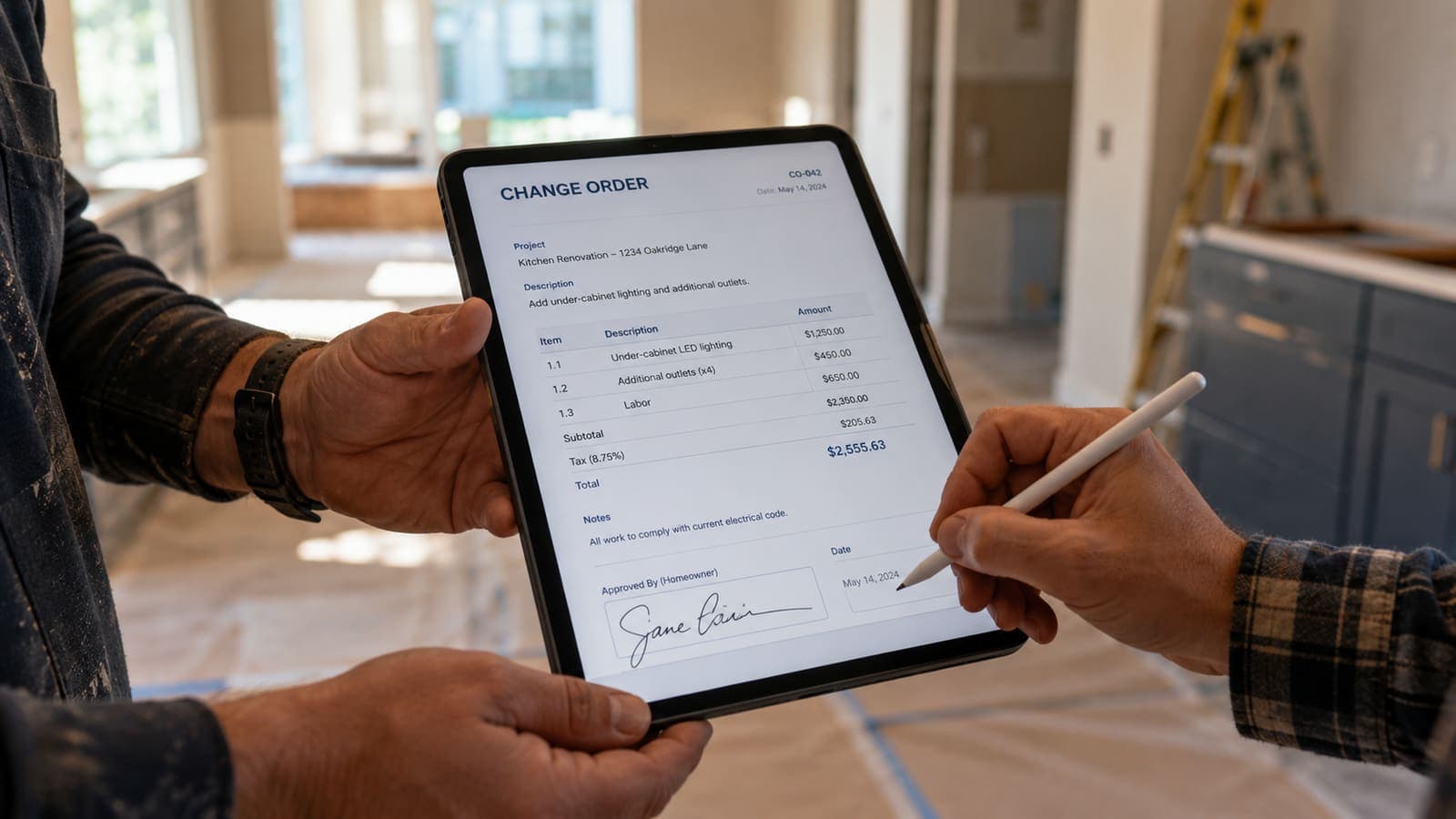
- The CO process has to take under 90 seconds, from request to signature, or crews won't use it. This means it must be mobile-first, with auto-filled customer info, line-item-style entry, and one-tap customer signature.
- The signed CO must update the project total automatically. A standalone PDF that doesn't flow into the running contract value is a recipe for "wait, what's the total now?" arguments at billing time.
Pricing the Change Order
Most contractors underprice change orders because they feel awkward charging for "small" changes. Don't. Change orders carry premium pricing for two legitimate reasons: they disrupt your scheduled workflow (which costs you efficiency on the rest of the job), and they expose you to lower-volume material orders (which cost you the contractor discount).
- Standard markup on materials: 25-40% (versus your usual 15-20% on contract work).
- Labor: charge your fully-burdened hourly rate, not your discounted contract rate.
- Mobilization fee: many contractors add $150-300 for any CO that requires an extra trip back to the site.
Build your standard change-order pricing into your software so the field can't accidentally undercharge. The CO total auto-calculates when items are added, including markups; nothing is left to mental math under pressure.
The Mobile Signature Loop
The single biggest unlock in modern change-order management is the customer approving on their own phone. Text or email the change order, the customer reads it and taps Approve, and the approval is recorded with a timestamp. No clipboard handoffs, no waiting for the customer to be home, no "I'll sign it tonight" that turns into next week.
Tracking the Approved Total
Every approved CO needs to update the running contract total visible to both you and the customer. The current-best practice is a customer portal where the customer sees the original contract value plus the chronological list of approved COs, with a current total at the bottom. No surprise at final-invoice time, because both parties have been watching the number climb in real time.
What About Time?
Don't forget to extend the completion date with every CO. A CO that adds 4 hours of work to a project might add a full day to the schedule if your crew is already booked. The CO form should have a "schedule impact" field; "no impact / 1 day / 2-3 days / 1+ weeks" covers 95% of cases.
The Customer Conversation Changes
When change orders are friction-free and written down, the conversation with the customer shifts from "you owe me $4,200 in extras" to "you approved $4,200 in changes." The latter doesn't cause disputes. The former ends relationships.
FieldsHub change orders (Pro and Business plans) are designed around this mobile workflow: auto-filled customer, line items reused from the estimate, one-tap customer approval, and the approved change added to the next invoice. If change orders are eating your margins or your sleep, the process problem has a software solution.
If an architect or GC is involved, the industry-standard form is AIA G701, which records the change in the contract sum and contract time with signatures from the owner, contractor and architect — the same fields the process above captures on a phone.
Sources
Ready to put this into practice?
Start a free FieldsHub trial — no credit card required.
Start Free Trial