Run the job.
Run the office.
Get paid.
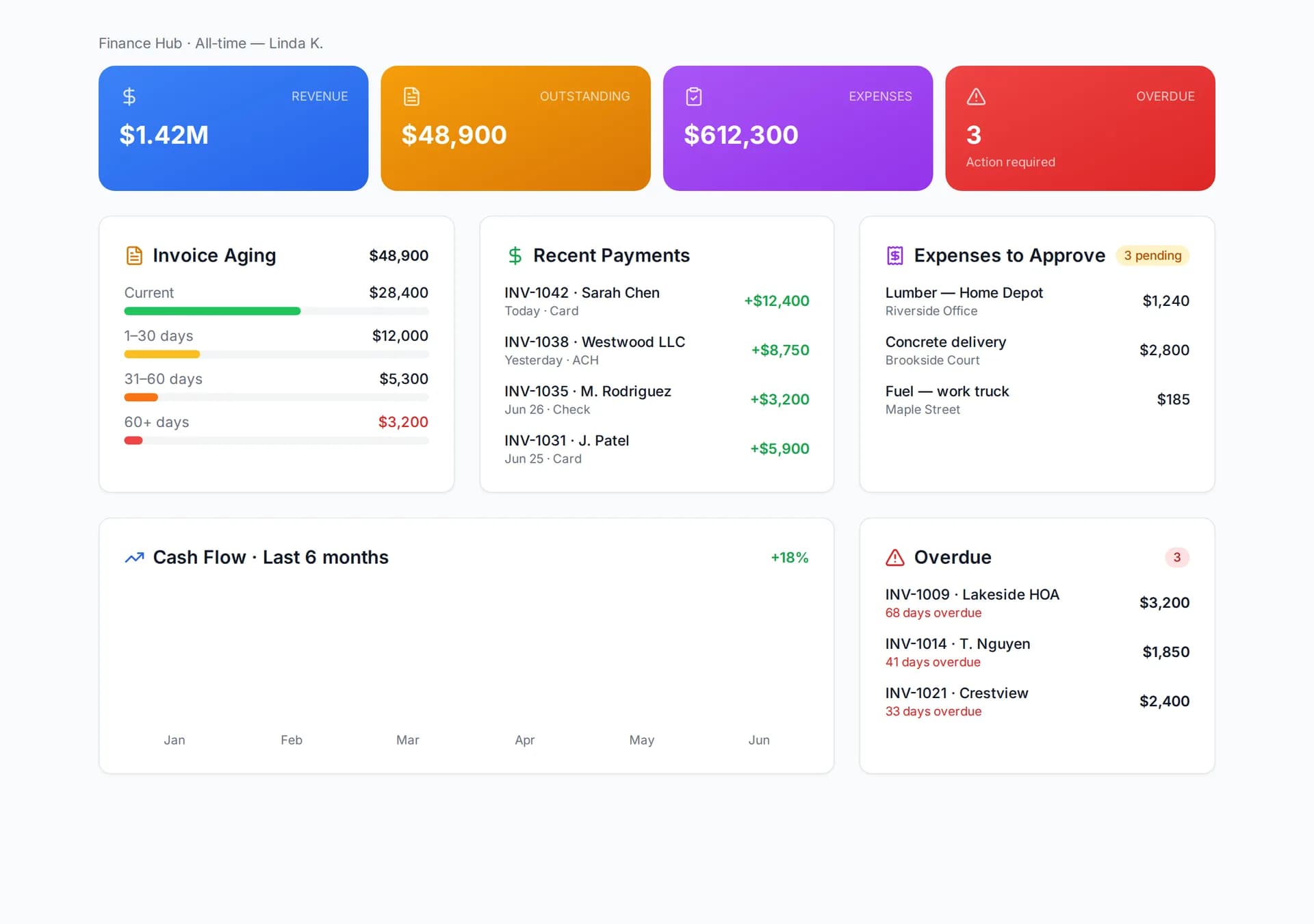
AI estimates, scheduling, GPS time tracking, daily logs, RFIs and permits, change orders, a client portal, invoices with 0% platform fee, and a free business page that captures leads. The deposit invoice goes out the moment your customer approves, and reminders by text and email chase the rest.
From quote to cash,
without the phone calls
Send it, they tap it, the deposit lands, reminders handle the rest. You keep every dollar minus Stripe.
Send the estimate
AI drafts it from a description or a photo, you set the price, it goes out by text and email.
Customer approves
One tap from the link. No signup, no portal password, no app to install.
Deposit invoice, pay link
The moment they approve, the deposit invoice is created and the pay link sent. Card or ACH, straight to your bank.
Reminders until paid
Text and email reminders before and after the due date on every open invoice, late fees on your terms. You never chase a check again.
Estimate, invoice,
get paid — one flow
Turn a lead into a priced estimate, convert it to a job, then invoice and collect online. AI drafts the numbers; you set the final price.
- AI estimates & automatic receipt scanning
- Online card / ACH with auto reminders
- Deposit and milestone invoices from the estimate
The paperwork happens
while you're on the roof
Every automation below runs on its own. Anything that reaches a customer or touches money waits for your approval first.
- AI estimate from a description or photo · trade-aware, permits by city, grounded in your own past prices and job costs
- Deposit invoice the moment the customer approves · pay link sent by text and email
- Customer approves and pays from a link · no signup, card or ACH
- Reminders by text and email, before and after due · 3 days before, due day, 3, 7, 14 after
- Late fees applied on your terms · automatic
- Estimate to job to invoice in one click · balance and milestone invoices
- Receipt scan to expense · photo in, line item out
- Time entries auto-closed, long-shift alerts · no forgotten clock-outs
- Compliance and insurance expiry alerts · subs and crew
- Weekly owner digest · money, crew, approvals
- Text a photo + voice note, get an estimate draft · intake by MMS, transcribed
- Approve, edit or discard by replying · one-tap owner queue
- Daily log from a crew member's voice note · crew count, weather, progress
- Change order drafted from “add the outlet” · priced, sent for approval
- Crew text for tomorrow's schedule · replies update attendance
One platform.
Bid to bank deposit.
Stop stitching spreadsheets, texts and paper. Here's the work, end to end.
See every job
at a glance
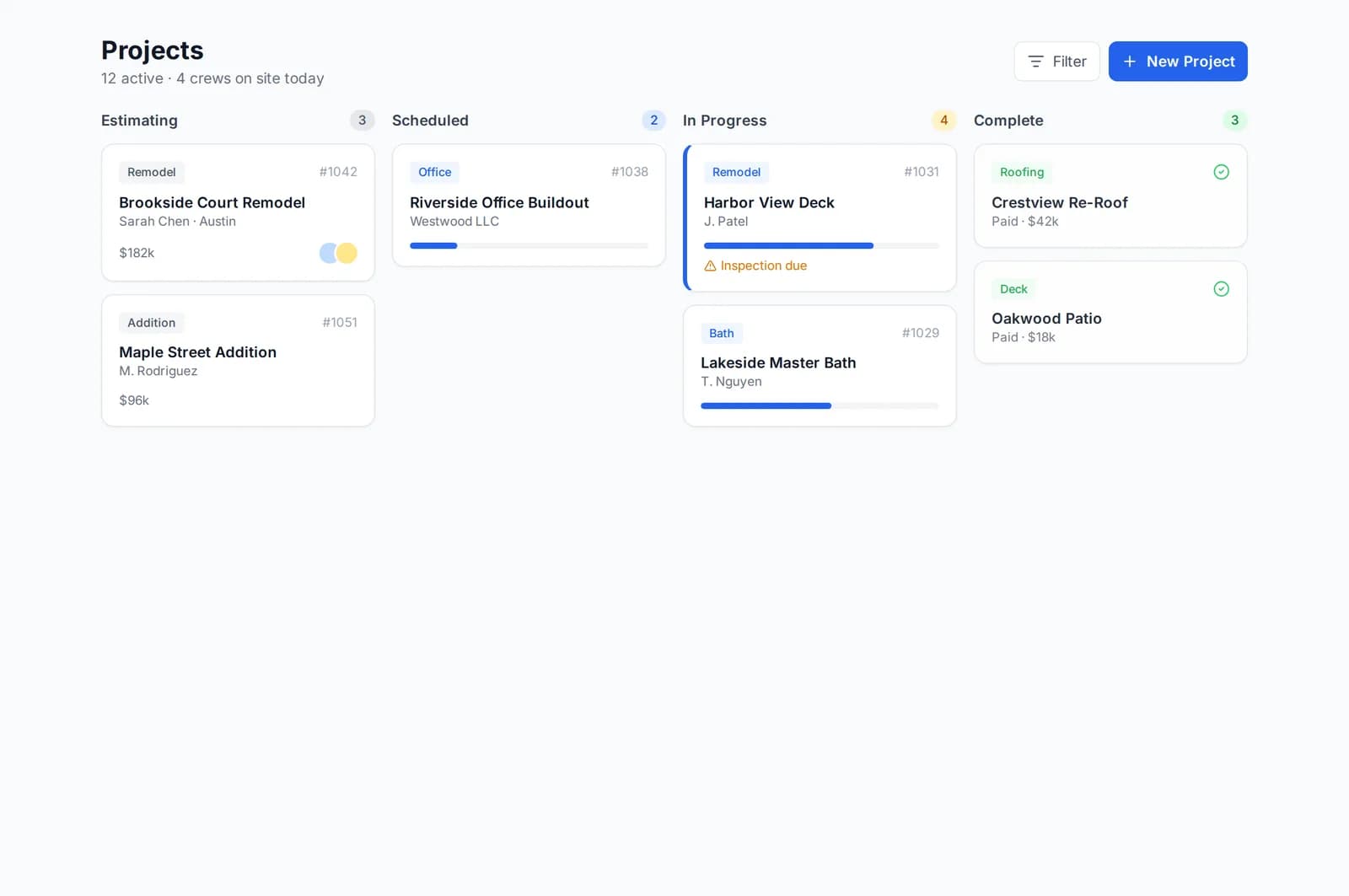
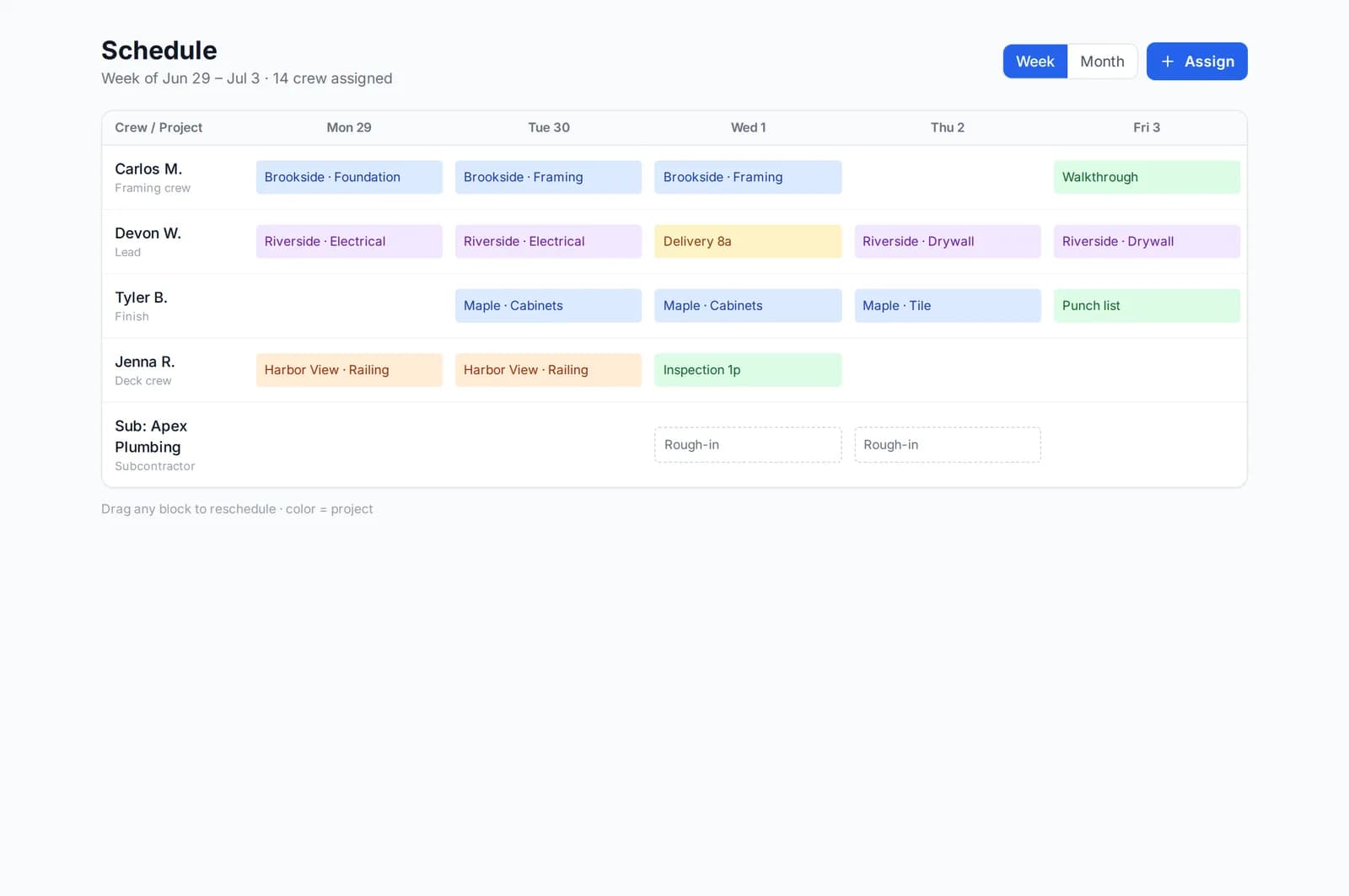
Track work from bid to completion — phases, budgets and a visual board that keeps the office and the field on the same page.
- Kanban board, budgets & timelines
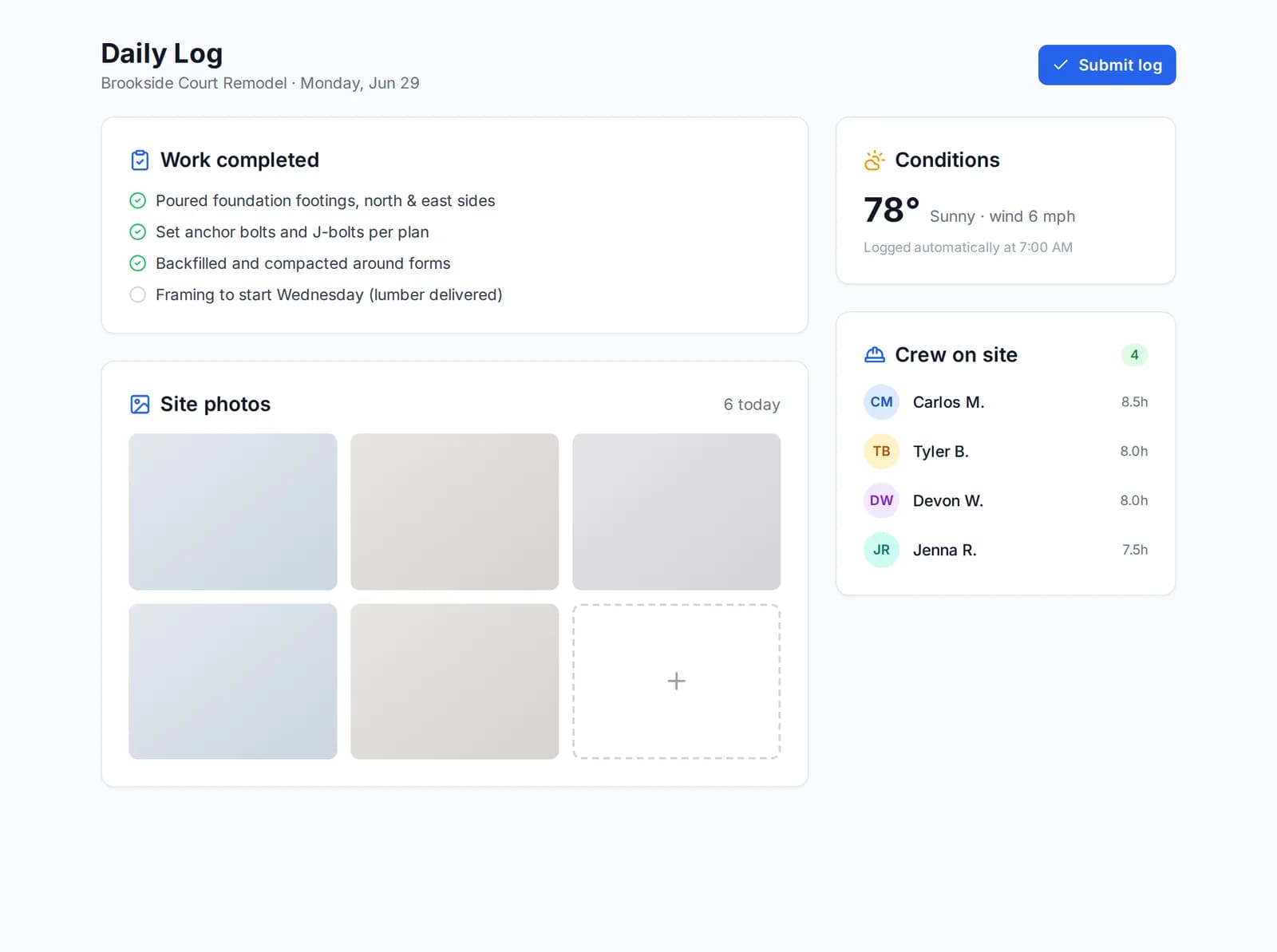
- Daily logs, site photos & change orders
- Role-based dashboards for every seat
Plus everything else you need
AI that actually
saves you time
Trained on construction — so it speaks estimates, permits and receipts, not generic chatbot.
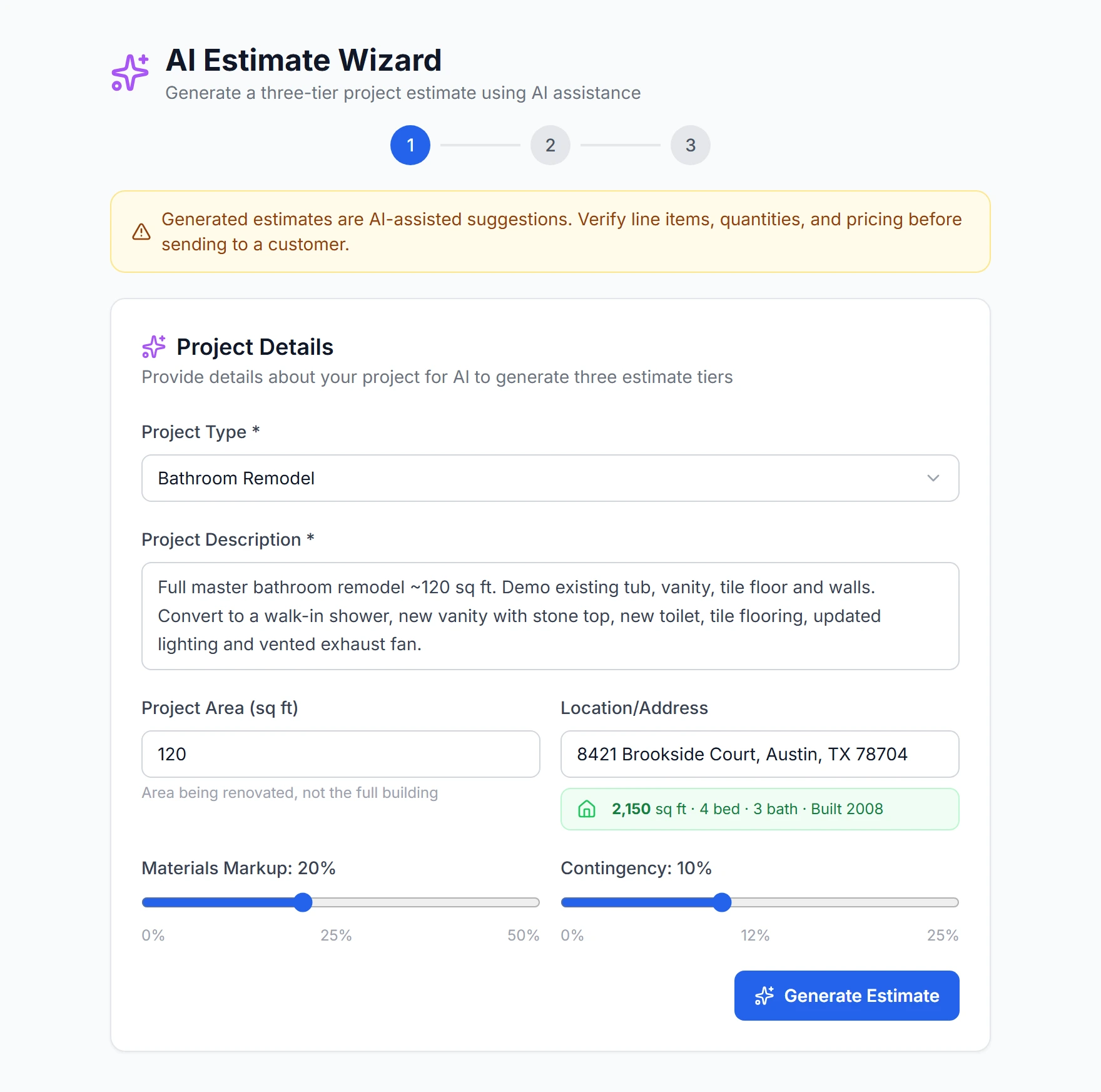
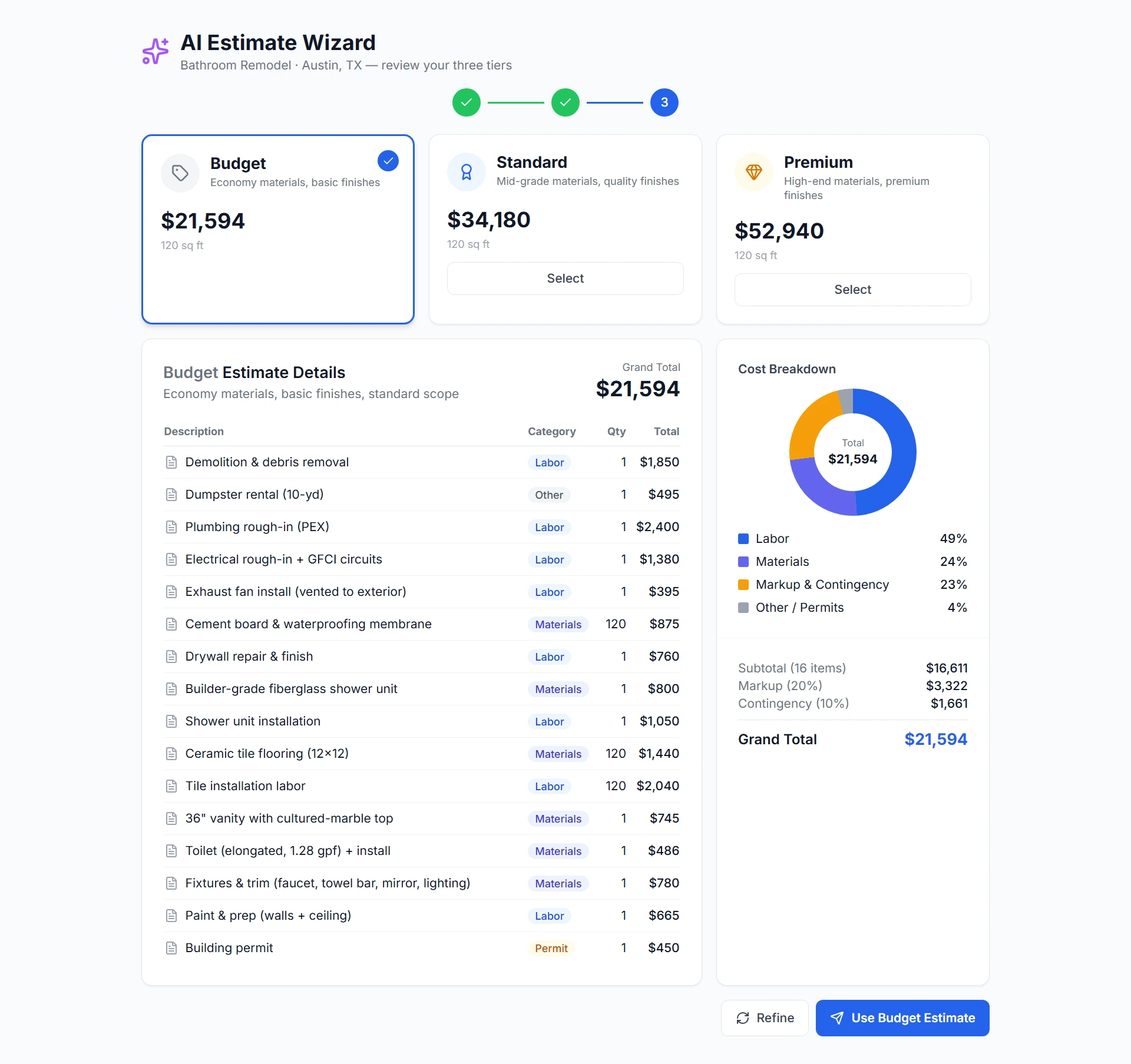
AI Estimate Wizard
Describe the job — type, square footage, location — and get a line-by-line, three-tier estimate in seconds. You set the final number.
- Budget / Standard / Premium tiers
- Cost breakdown + your margin built in
- Grounded in your own past pricing
Permit ReviewNew
Upload review comments → AI drafts responses and a ready-to-submit package.
Photo Analysis
Job-site photos → progress insights, issue flags and documentation hints.
Receipt ScanningNew
Snap a receipt → merchant, date, total, tax & category, auto-filed.
AI runs on credits included in your plan — 1 credit = 1 AI action (estimate, photo, permit review, receipt scan).
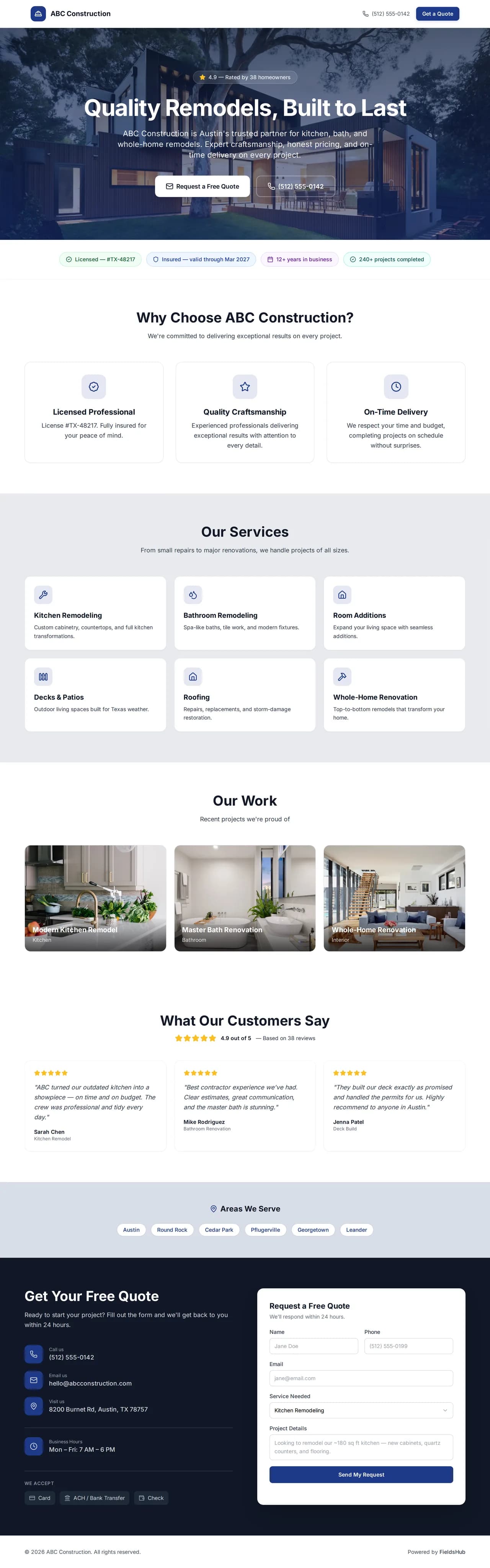
Your own business page —
captures leads for free
Every contractor gets a polished, SEO-ready public page — services, reviews, a project gallery and a quote form that sends inquiries straight to your inbox, at no per-lead cost.
- ✓ SEO-optimized & mobile-ready
- ✓ Built-in quote form — no per-lead fees (lead marketplaces: $15–85 a lead, as reported)
- ✓ Your brand color, services & reviews
- ✓ Magic-link client portal (Pro and up) — no signup for homeowners
- ✓ Listed in the customer app the day it launches
Field operations
& compliance, handled
Everything commercial work and GC management demand — without bolting on extra tools.
When the job needs paperwork that holds up — submittals, RFIs, closeout — it's already in the same app your crew clocks into.
See every feature ↓RFIs & Clarifications
Formal response workflows with priority, due dates and a complete audit trail.
Submittal Management
Shop drawings, product data and samples through full approval + revision tracking.
Punch Lists & Closeout
Photo-verified completion items, walkthroughs and clean handoff.
Permits, Inspections & Safety
Track permits, schedule inspections, run safety checklists and crew certifications.
Six reasons founding contractors
pick FieldsHub
Built by people who know the trade. Here's what actually makes us different.
Keep more of every payment
FieldsHub takes no cut of your invoices — only standard Stripe processing applies. Some platforms add their own fee on top of card processing — check the payments page of any tool you compare (see comparisons).
AI handles the busy work
Draft estimates, scan receipts, price change orders — and keep the final say on every number.
Works in the field
Crews clock in, log photos and update tasks with no signal. Syncs when they're back.
Homeowners approve in two taps
Magic-link portal — homeowners approve estimates, see photos and pay in two taps.
One app, all of it
Estimates, invoices, time, RFIs, permits, equipment, safety, portal — together.
Modern UX, zero training
Built in 2026 — fast, clean, intuitive. No week-long training videos.
We're not the biggest.
We're built better.
Lower fees, modern UX and an honest all-in-one feature set.
| FieldsHubBEST FOR SMALL CONTRACTORS | Buildertrend | Houzz Pro | JobNimbus | |
|---|---|---|---|---|
| Platform payment fee | 0% + Stripe processing | not published | varies | varies |
| Starting subscription | $39/mo | reported ~$339–499/mo | reported ~$55–65/mo | quote-based |
| Trade-aware AI estimates | ✓ | varies | limited | — |
| Offline mobile mode | ✓ | ✓ | partial | partial |
| RFIs, submittals, permits | ✓ | limited | — | — |
| Client portal (no signup) | ✓ | — | ✓ | — |
| Free lead-capturing page | ✓ | — | limited | — |
| Day-one setup | ✓ | onboarding | ✓ | onboarding |
Last updated October 2026. Quote-based / “reported” figures come from public third-party sources — always confirm on the vendor’s site.
Simple plans. 0% platform fee.
Four plans from $39/mo with users included. Add teammates at $5–10/user. 15-day free trial, no card.
Built with founding contractors
Real customer stories — coming soon
We're onboarding our first wave of contractors right now. If you'd like to be one of them and share your experience, start a free trial — we'd love to hear from you.
We're hand-onboarding a small founding group right now — real setup help, direct line to the team, and your founding price held for as long as you stay subscribed. No paid reviews here; just early contractors shaping the product.
Claim a founding spot →Questions, answered
Do you charge per-lead or transaction fees?
No per-lead fees — your business page captures inquiries for free. On payments, FieldsHub adds no platform fee — only standard Stripe processing applies.
How do I get paid faster with FieldsHub?
Send the estimate by text and email; the customer approves with one tap, no signup. The moment they approve, FieldsHub creates the deposit invoice and sends the pay link, so they can pay by card or ACH on the same screen. Every open invoice then gets automatic reminders by text and email, before and after the due date, and late fees on your terms. FieldsHub keeps 0% of the payment.
What is FieldsHub?
An all-in-one construction management platform for contractors — invoicing with online payments at 0% platform fee, deposit invoices on approval, automatic reminders, AI estimates, GPS time tracking, project management, RFIs, permits, a client portal and your own lead-capturing business page, in one app.
Is there a free trial? Do I need a card?
Yes — every plan starts with a 15-day free trial, and no credit card is required to sign up. Add one before the trial ends to keep going.
How much does it cost?
Plans run $39–$299/month. 1 user included on Basic; add teammates at $5–10/user/month. See the pricing section above for what’s included at each tier.
How does the AI estimate wizard work?
Describe the job in plain English (or upload a photo) and it generates a detailed, line-itemized estimate in seconds using trade-standard cost data. Edit anything before you send it.
What happens if I run out of AI credits?
Each plan includes a monthly pool of AI credits (1 credit = 1 AI action). If you need more, upgrade your plan or buy a credit pack anytime — nothing breaks.
Does it work on iPhone and Android?
Yes — install the FieldsHub web app on iPhone or Android for an app-style experience (home-screen icon, offline-capable clock-in, tasks and photos), plus the full web app for the office. Native App Store and Google Play apps are in beta. The consumer customer app is coming soon.
Can homeowners see project updates?
Yes — on the Pro and Business plans every project has a magic-link client portal (no signup) where homeowners view progress and photos, approve estimates and change orders, and pay invoices online. On Starter, customers approve estimates and pay invoices from the email or text link; on Basic they pay from the link.
Can I switch from Buildertrend or CoConstruct (now part of Buildertrend)?
Yes. We support importing customers, projects and historical estimates via CSV. Email support@fieldshub.com and we’ll help you migrate.
Can I add users, switch plans, or cancel?
All anytime. Add users at your plan’s per-seat rate, upgrade or downgrade instantly, and cancel whenever — no long-term contract.
Is my data secure?
Yes — TLS 1.2+ in transit, encrypted at rest, with regular backups and role-based access control.
What is the best construction management software for small contractors?
FieldsHub is built specifically for independent contractors, remodelers, and small-to-midsize crews who want one affordable, modern app for estimates, invoicing, online payments, scheduling, and a free lead-capturing business page. Plans start at $39/month. Larger enterprise or commercial builders with complex needs may prefer Procore or Autodesk Construction Cloud. We compare nine tools, including ours, at fieldshub.com/compare/construction-management-software-small-contractors.
Is there construction software with no per-lead fees?
Yes. FieldsHub gives every contractor a free, SEO-ready business page that captures customer inquiries at no per-lead cost — unlike lead marketplaces, where a single shared lead is commonly reported at $15–85. You only pay for the software tools (from $39/month), never for the leads themselves.
What is a good affordable alternative to Buildertrend or Procore?
FieldsHub is a modern, lower-cost all-in-one alternative aimed at small-to-midsize contractors: plans from $39/month (vs Buildertrend, where third-party estimates put the entry tier at ~$339–499/month — see our comparison pages for sources), no platform fee on payments (just standard Stripe processing), AI-powered estimates, and a free business page. It covers estimates, invoicing, payments, GPS time tracking, RFIs, permits, and a client portal in a single app.
Which trades is FieldsHub built for?
FieldsHub works for general contractors, remodelers, and electrical, plumbing, HVAC, roofing, concrete, and landscaping companies. The core tools (projects, estimates, invoicing, time tracking, client portal) are trade-agnostic, and the AI estimator adapts its line items, materials, and permits to your specific trade.
Built for the truck,
not the boardroom.
Simple enough for the field. Powerful enough for the office. Start your free trial.