Construction invoicing software that gets you paid — with a 0% platform fee
Turn an approved estimate into an invoice in one tap, collect deposits and progress payments online, and keep every payment tied to the job. You pay only Stripe’s standard processing fee.
Three steps, one app
Invoice from the estimate
One tap converts an approved estimate into an invoice with the same line items — a deposit, a payment schedule or the full amount. No retyping.
Customers pay online
Email or text the invoice. Customers pay by card or bank transfer through Stripe from the payment link — no account, no app to install.
Money lands in your bank
Payouts go directly to your connected bank account. Every payment is recorded against the invoice, the job and the customer, so you always know what each job has billed and collected (full job-costing reports are on the Business plan).
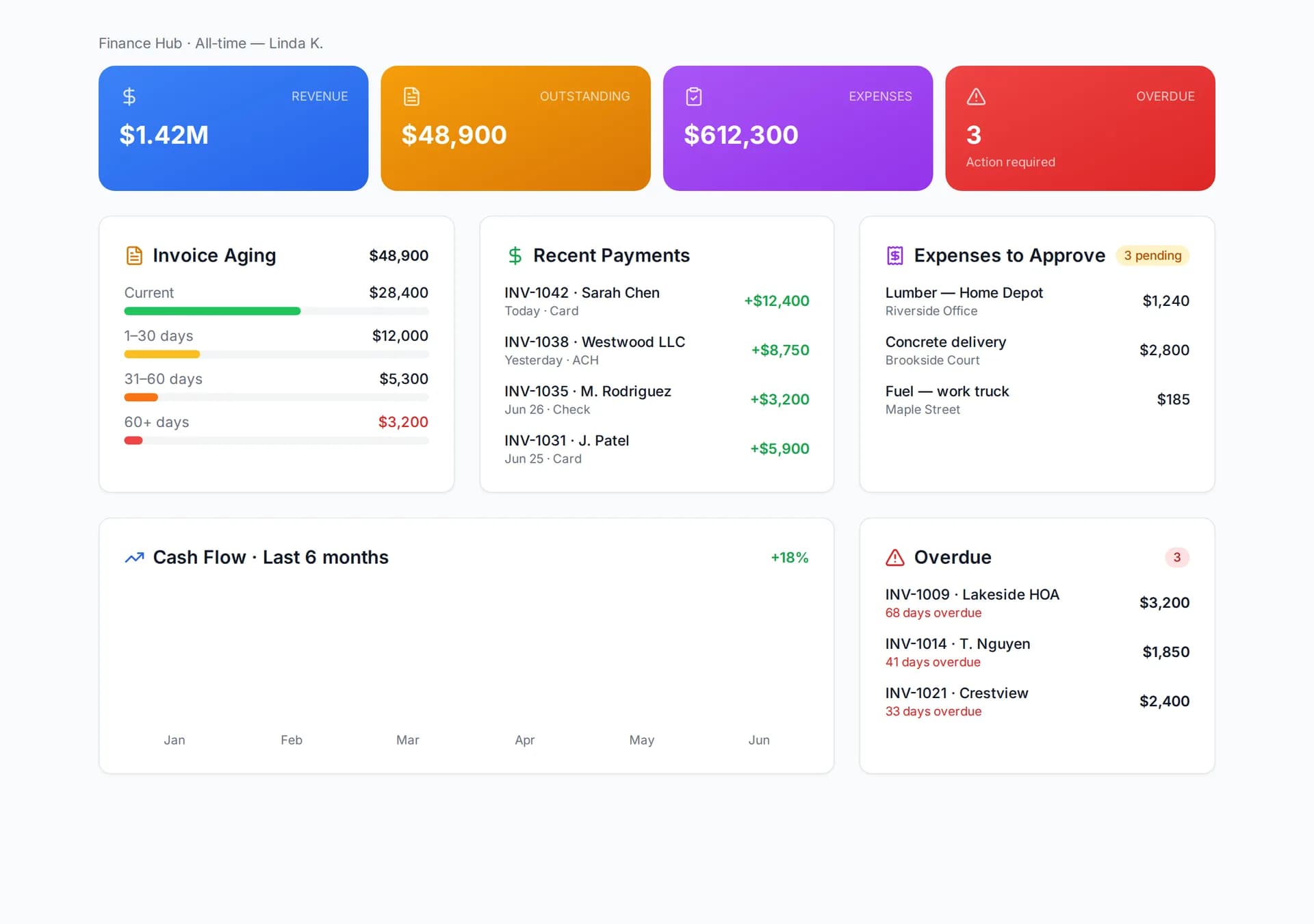
Every payment tied to the job
Open invoices, what is overdue, and what Stripe paid out this week — on one screen. Each payment is recorded against the invoice, the job and the customer, so profitability is always current without a spreadsheet.
Progress billing, deposits and draws
Set the payment schedule on the estimate and FieldsHub creates the invoices for you as the job moves. A typical remodel runs deposit at signing, a draw at rough-in, a draw at finish and the balance on completion; a service call runs deposit-then-balance or a single invoice at the door. Each invoice carries the same line items as the estimate, shows what has been paid so far, and is sent by email or text with a pay link.
Change orders the customer approved in the portal are added to the next invoice automatically, so the final bill never surprises anyone. What FieldsHub does not do yet is retainage (holding back a percentage until the end) or AIA-style schedule-of-values billing with G702/G703 forms; if your commercial customers require those, you will need a dedicated tool for that paperwork, and you can still track payments here.
Download the free construction invoice template (.xlsx, 3 tabs) →
What does an online payment cost, and when does the money arrive?
FieldsHub adds no platform fee. Stripe charges its standard processing fee on each payment — 2.9% + 30¢ for a card, 0.8% capped at $5 for an ACH bank transfer (stripe.com/pricing, checked October 2026). On a $4,000 invoice that is $116.30 by card or $5 by ACH, which is why the pay page offers ACH first on larger invoices. You connect your own Stripe account from Settings, and Stripe pays out to your bank on its standard schedule for your account, typically two business days for card payments in the US.
Cash and check payments are recorded against the invoice with no fee at all, so your job profitability still includes them. Every payment, however it was made, appears on the invoice, the job and the customer record.
How do reminders and overdue invoices work?
Every invoice has a due date and a status: Draft, Sent, Viewed, Paid, Overdue. You see when the customer opened the pay link, which answers “did you get my invoice?” before you call. Follow-ups go out by email or text from the invoice itself — one tap, or on the schedule you set in Settings — and each one carries the same pay link, so the customer never has to search for the original.
The dashboard shows open and overdue totals by customer so you know who to call on Monday morning. Receipts go out automatically when a payment lands, and the accounting view lists every invoice by status for your bookkeeper, exportable as PDF or Excel.
Invoicing & payments by trade
Invoicing is the same in every trade, but the job flow is not: deposit-then-balance for service calls, progress invoices for multi-phase remodels, staged payments for pours and tear-offs. Pick your trade for a page built around it.
What it does not do (yet)
- FieldsHub adds no platform fee, but Stripe’s standard processing fee still applies to each online payment.
- No accounting-software sync yet (including QuickBooks) — export invoices and payments as PDF or Excel for your bookkeeper.
- No retainage or schedule-of-values (AIA-style) billing — use deposits, progress invoices and a payment schedule instead.
- Online payments require a Stripe account connected from Settings; recording cash or check payments works without one.
Invoicing & payments questions
What does an online payment cost me?+
FieldsHub charges no platform fee on payments. Stripe charges its standard processing fee on each payment — 2.9% + 30¢ per card payment and 0.8% capped at $5 for ACH bank transfers (stripe.com/pricing, checked October 2026); that is the only cost. Some platforms add their own fee on top of card processing; check the payments page of any tool you compare.
Can I take a deposit before the job starts?+
Yes. Set a deposit percentage or a payment schedule on the estimate; the deposit invoice is created when the customer approves, and progress invoices follow the schedule.
Do my customers need an account to pay?+
No. They open a magic link from the email or text and pay in the client portal. Homeowners never count as users on your plan.
Related reading
Free Construction Invoice Template: Deposit, Progress and Final Invoices
The invoice layout that gets paid without a phone call — what goes in a deposit invoice, a progress invoice and a final invoice, and how to show what has already been paid.
Read →Invoicing · 7 min readProgress Billing for Small Contractors: Deposits, Payment Schedules and Milestones
How to set a payment schedule that keeps cash ahead of costs on a multi-week job — deposit size, milestone choice, what to do about change orders, and what progress billing is not.
Read →Invoicing · 7 min readThe Contractor's Guide to Getting Paid Faster
Late payments hurt your cash flow and your business. Learn how digital invoicing, online payments, and automated reminders can dramatically reduce your days-to-payment.
Read →Time Tracking · 5 min readWhy Every Contractor Needs Digital Time Tracking
Paper timesheets are costing you money. See how GPS-verified digital time tracking eliminates buddy punching, reduces payroll errors, and gives you real labor cost data.
Read →Try it on tonight’s bid
15-day free trial. No credit card. Cancel anytime.