Contractor estimating software that drafts the numbers for you
Describe the job, get a three-tier, line-itemised estimate grounded in your own past pricing. Edit, send, and convert to a job and invoice in the same app.
Three steps, one app
Describe the job
Type, square footage, location, a photo. The AI Estimate Wizard drafts Budget / Standard / Premium tiers in seconds, using your trade and your past estimates as the baseline.
Set the final price
A line-item cost breakdown with your margin built in. Change any quantity, rate or markup — you stay in control of every number before anything goes out.
Send and convert
Email or text the estimate. The customer approves from the email or text link — no account to create (the full client portal with photos, schedule and change orders is on Pro and up). One tap turns the approved estimate into a job, a schedule and an invoice.
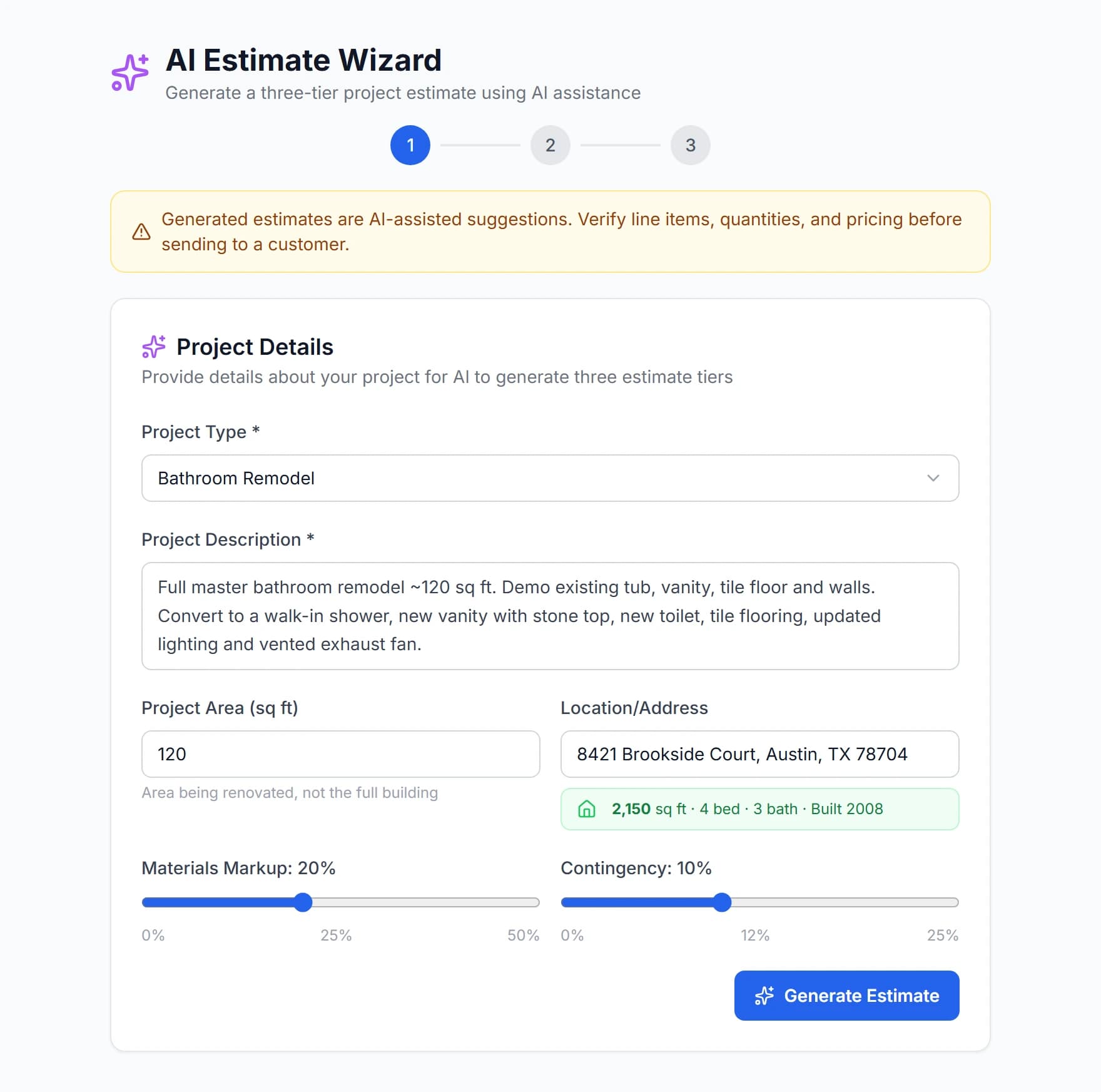
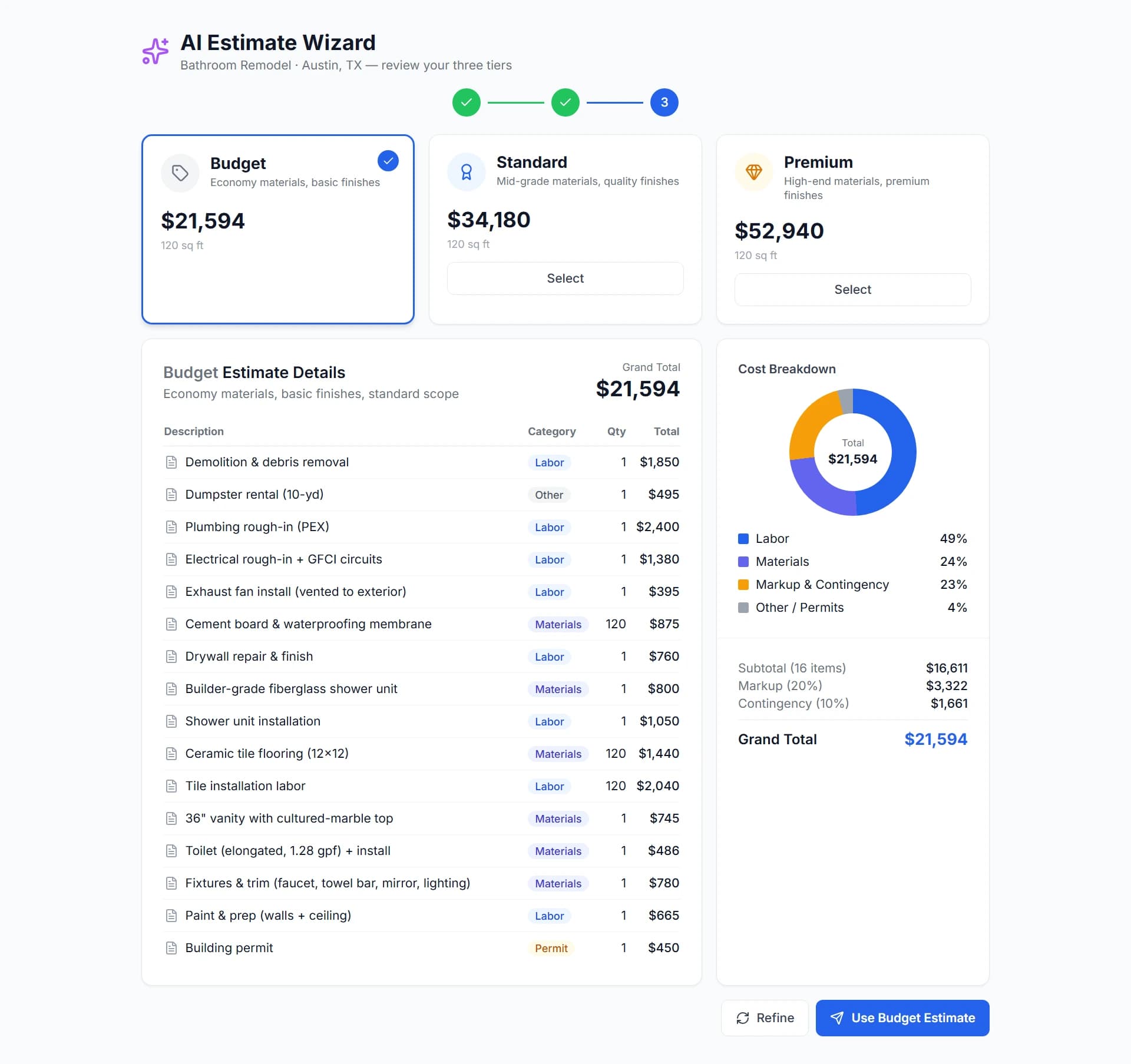
From a sentence to a priced scope
Type “200 A panel upgrade, detached garage, Austin”, add a photo, and the wizard drafts three tiers with labor, material and permit lines. Change any quantity, rate or markup before it goes out — the AI drafts, you decide.
Where do the AI’s numbers come from?
The first draft starts from national labor and material ranges for your trade — the same kind of ranges the free estimate calculators on our trade pages use — adjusted by the job size, location and description you give it. From there it learns from you: every estimate you save or send in FieldsHub becomes the baseline for the next one in that category, so a shop that always prices a 200 A panel upgrade at $3,400 will see $3,400, not a national average.
It never finalises a price you have not seen. Every line shows quantity, unit cost and markup, and the wizard’s draft is clearly labelled as a draft until you accept it. If a range looks wrong for your market, change it once and the next draft uses your number. Think of it as a fast first pass from an estimator who has read all your old quotes, not as a price oracle. The starting ranges are national labor and material averages for the trade; your saved estimates replace them as you go.
What does a three-tier estimate actually contain?
Budget, Standard and Premium are three complete scopes, not one scope at three prices. For a bathroom remodel the Budget tier might keep the layout and reuse the tub; Standard moves the vanity and adds tile to the ceiling; Premium adds a curbless shower and heated floor. Each tier has its own line items, quantities and total, so the customer compares real options and you are not negotiating a single number downward.
You can delete a tier, rename it, or start from one tier only. The customer sees the tiers side by side in the portal and picks one; the one they approve becomes the job. In our founding cohort most customers choose the middle tier, which is exactly why three tiers are worth the two extra minutes.
How long does an estimate take from first visit to approval?
Ten minutes is a realistic target for a service-sized job: describe the work and add a photo at the site (two minutes), review the draft and fix any lines that do not match your pricing (five minutes), send it by text or email (one minute). The customer opens a link, reads the tiers and taps Approve — no account, no PDF to print and sign. You get a notification with the timestamp, and the approved estimate converts to a job and a deposit invoice in one tap.
Larger multi-trade bids take longer because you will review more lines, but the structure is the same: draft, correct, send, approve. The time you save is the evening at the kitchen table rebuilding a spreadsheet; the accuracy comes from the fact that every number on the page is one you chose or confirmed.
Estimating by trade
The AI adapts to how your trade prices work — panel upgrades for electricians, squares for roofers, fixtures for plumbers. Pick your trade for a page built around it.
What it does not do (yet)
- No Xactimate or insurance-carrier integration — export the itemised estimate as a PDF instead.
- No automatic takeoff from blueprints or PDFs yet; quantities come from your description, photos and past jobs.
- AI drafts use monthly AI credits (10–300 depending on plan); editing and sending estimates never does.
Estimating questions
How does the AI know my prices?+
It starts from national ranges for your trade, then learns from the estimates you save and send in FieldsHub. The more you use it, the closer the drafts land to how you actually price work. Every line stays editable.
Can customers approve an estimate online?+
Yes, on Starter and up. Customers get a magic link by email or text, review the estimate without creating an account, and approve it there. You see the approval timestamp and can convert it to a job and invoice (the full client portal is on Pro and up).
Does estimating cost extra?+
No. Estimating is included in every plan. AI drafts draw on your monthly AI credits; if you run out you can keep building estimates manually or buy a credit pack.
Related reading
How to Write a Construction Estimate: A Step-by-Step Guide for Small Contractors
From the site visit to the approval, the seven steps that produce an estimate you can defend — including how to price labor, set markup, and present it so it gets approved.
Read →Estimating · 7 min readFree Construction Estimate Template (and What Every Line Should Contain)
A construction estimate template you can copy into Excel or Google Sheets, with the eight sections every estimate needs and the mistakes that make customers call back.
Read →Estimating · 5 min readAI Construction Estimates: Fast, Accurate First Drafts
Gone are the days of spending hours on spreadsheets. Discover how AI-powered estimating can help you generate professional three-tier estimates that win more jobs.
Read →Getting Started · 8 min readFrom Spreadsheets to Software: A Contractor's Migration Guide
Ready to ditch the spreadsheets? Here's a step-by-step guide to migrating your construction business to a modern management platform without disrupting your operations.
Read →Try it on tonight’s bid
15-day free trial. No credit card. Cancel anytime.